Ever wonder how huge cyber attacks happen or why your computer sometimes acts super slow for no reason? Botnets might be the culprit. These networks of hacked devices are a big deal in online security for everyone today. Lots of people don’t really get what botnets are, how they work, or why they matter, even with how common they are.
This guide will break down botnets for you in plain English. We’ll talk about what they are, how bad guys create and use them, the real damage they cause, and most importantly, how you can keep your devices from joining one.
Botnets Explained: The Simple Version
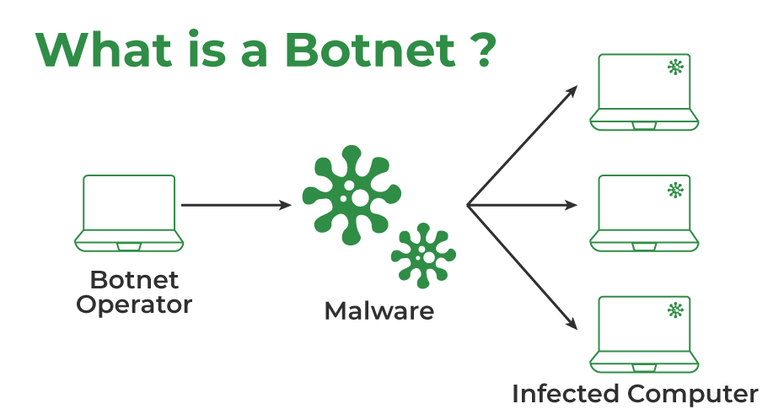
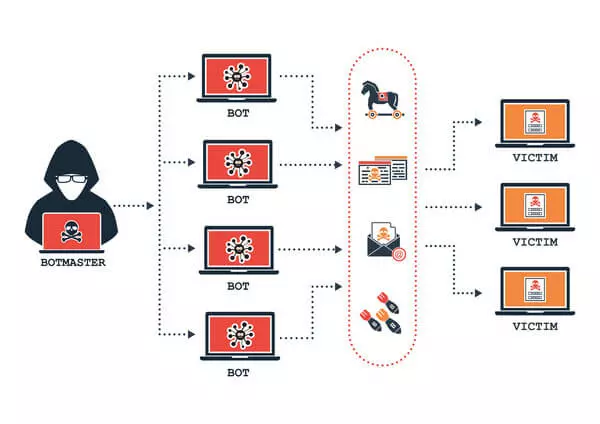
The word botnet comes from robot and network. Simply put, a botnet is a group of infected computers, phones, tablets, or other online gadgets. Criminals secretly control these devices without their owners knowing. Think of it like a puppet show where one person pulls the strings for many puppets. But here, your devices are the puppets, and a cybercriminal is the puppeteer.
Each device in a botnet is called a bot or zombie. The person running the botnet is often called the bot herder. These infected gadgets usually work normally most of the time. That’s why owners often don’t even realize their device has been taken over. Your computer or phone could be in a botnet right now, quietly doing bad stuff in the background while you’re working, surfing the web, or playing games.
How Big Is This Problem?
Modern botnets can have thousands, hundreds of thousands, or even millions of infected devices. Some of the biggest botnets found include:
Big Botnets We’ve Seen:
- Mirai: Over 600,000 hacked IoT devices at its busiest
- Emotet: Infected hundreds of thousands of computers globally
- Conficker: Believed to have 10-15 million infected computers
- TrickBot: Infected over 1 million devices
- Necurs: Controlled about 9 million computers
- GameOver Zeus: Around 500,000 to 1 million infected machines
These numbers aren’t just figures; they’re real devices that belong to real people and businesses. Your smart TV, home Wi-Fi router, computer, or even your internet-connected fridge could easily become part of these huge criminal networks.
How Botnets Are Made: Getting Infected
Knowing how devices get swept into botnets helps explain why they’re so common and tough to get rid of. Cybercriminals use different ways to infect devices and add them to their botnet armies.
Usual Ways Devices Get Infected
The path from a clean device to a botnet member often follows a few routes. Cybercriminals always change their tricks, but some infection methods keep working well.
Main Ways They Get In:
- Phishing Emails: Bad links or attachments in fake but convincing emails
- Bad Downloads: Infected software, games, or video files
- Drive by Downloads: Getting infected automatically just by visiting a bad website
- Exploit Kits: Automated tools that find and use software weaknesses
- Infected USB Drives: Physical drives with malware on them
- Social Engineering: Tricking people into installing malware themselves
- Network Weaknesses: Using gaps in network security
- Default Passwords: Getting into IoT devices that still have their factory passwords
Phishing is still one of the most successful ways to infect devices. An email might look like it’s from your bank, a delivery company, or a coworker. It’ll have an urgent message telling you to open an attachment or click a link. That file or link has malware that quietly installs itself on your device, adding it to the botnet.
The Quiet Install
What makes botnet infections especially tricky is how sneaky they are. Today’s botnet malware is made to stay hidden. After it infects a device, the malware usually does a few things to settle in and avoid being found.
First, the malware makes sure it starts every time your device turns on. It might change system settings, set up tasks to run automatically, or add itself to startup programs. This keeps the infection alive even after you restart your device.
What Happens After Infection:
- Makes sure it starts every time the device turns on.
- Turns off or hides from antivirus software.
- Connects to special command and control servers.
- Waits for orders from the bot master.
- Downloads more bad tools if needed.
- Starts doing the bad things it’s told to do.
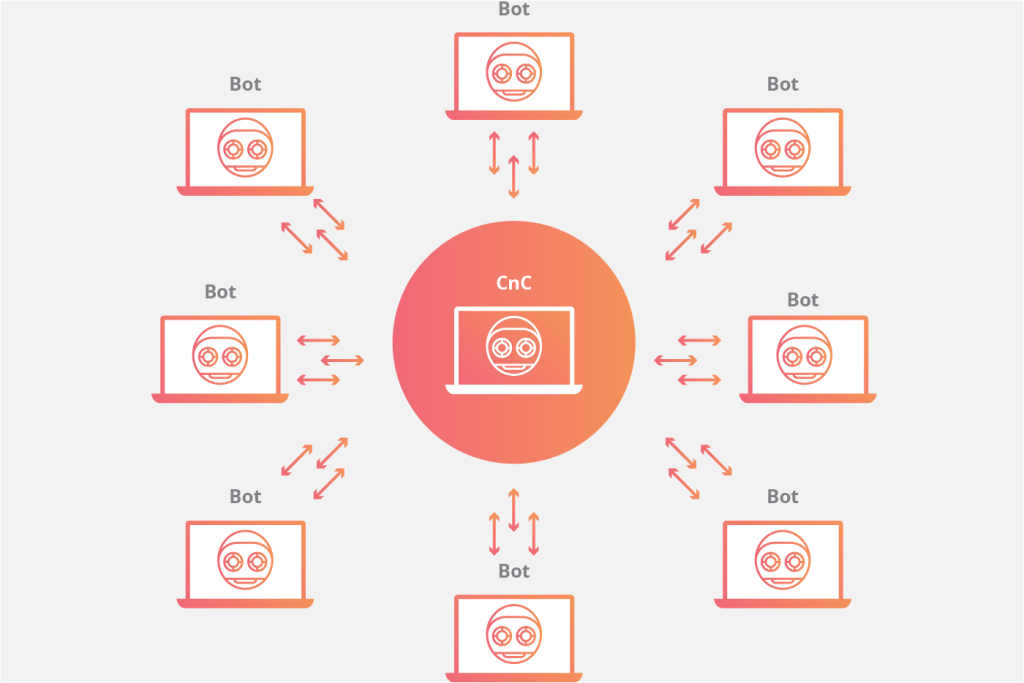
The infected device then talks to a command and control (C&C) server. This server is like the bot master’s headquarters, sending orders to all the infected devices in the botnet. The connection might look like normal internet traffic to fool security systems.
Command and Control: How Botnets Are Run
Once a botnet is set up, the bot master needs a way to talk to and control all the infected devices. The command and control system is like the brain of the botnet.
Old Way: Central Control
Older botnets used central command and control servers. All infected devices connected to one or more specific servers to get their orders. This setup was simple and worked, but it had a big problem: law enforcement or security experts could shut down the whole botnet by grabbing or blocking those C&C servers.
Centralized Control Features:
- One main control point
- Orders spread faster
- Easier for the bot master to run
- Can be taken down easily
- Easier to find and block
- Clear connection patterns
When police find and seize central C&C servers, all the bots lose touch with the bot master. Without orders, the bots usually stop working, basically taking the botnet out of action.
New Way: Spread Out Control
To avoid these single weak points, modern botnets are using spread-out setups more and more. Peer to peer (P2P) botnets spread the command and control job among the infected devices themselves. Instead of connecting to a central server, bots talk to each other to share instructions.
P2P Botnet Features:
- No single weak point
- Much harder to shut down completely
- Orders spread through the network
- More complex for bot masters to run
- Stronger against being stopped
- Tough for police to stop
In a P2P botnet, each infected device acts as both a receiver of commands and a sender of commands to other bots. The bot master can send commands into the network through any bot, and those commands spread through the network like gossip.
Domain Generation Tools
Another clever trick used by modern botnets involves domain generation algorithms (DGAs). Instead of connecting to fixed C&C servers, bots create hundreds or thousands of random website names every day and try to connect to them.
The bot master only needs to register a few of these randomly made domains to keep control of the botnet. Security teams have a hard time blocking all possible domains because there are just too many to find and block.
Benefits of DGAs:
- Creates thousands of possible C&C domains
- Bot master only needs to register a few
- Super hard to completely block
- Helps the botnet stay alive if C&C servers are shut down
- Gives backup ways to talk
- Makes defense tougher
What Botnets Are Used For: Bad Guy Stuff
Botnets aren’t just tech curiosities; they’re tools for serious crimes that cost billions of dollars every year. Knowing what botnets are used for helps show why they’re such a big problem.
DDoS Attacks (Overwhelming Websites)
Maybe the most famous use for botnets is launching Distributed Denial of Service (DDoS) attacks. These attacks flood target websites, services, or networks with tons of traffic, making them unavailable to real users.
Imagine a store with just one door. If a hundred people try to go in at the same time, they all get stuck, and no one can get through. DDoS attacks work like that but with internet traffic. The botnet sends so much traffic to a target that real users can’t get to it.
DDoS Attack Effects:
- Online stores: Lost sales when sites are down
- Online services: Unhappy customers who might leave
- Banks: Blocked transactions and security worries
- Gaming sites: Games interrupted and players frustrated
- Government websites: Public services stopped
- Extortion: Attacks threatened unless money is paid
Botnets make DDoS attacks really powerful because they spread the attack across thousands or millions of devices. Each bot sends a small amount of traffic, but all together, they create huge floods that even strong systems struggle with.
Sending Spam
A huge amount of spam emails comes from botnets. Cybercriminals use infected devices to send billions of spam messages. These messages might sell fake products, promote scams, or spread malware to create even more bots.
Spam Botnet Jobs:
- Send millions of emails daily from each bot
- Avoid spam blockers by using many different IP addresses
- Push fake products and services
- Spread malware through bad attachments
- Help with phishing scams
- Advertise illegal stuff
- Make money from fake clicks
By spreading spam sending across many devices with different IP addresses, botnets get around many spam filters. These filters usually look for lots of emails from one source. Each bot sends a small amount of spam that looks normal, but all together they reach millions of people.
Trying to Guess Passwords and Breaking In
Botnets make it possible to try and break into tons of online accounts. In one type of attack, criminals use stolen usernames and passwords from one website to try and get into accounts on many other sites. Since people often reuse passwords, these attacks often work.
Botnets make these attacks possible by spreading the login attempts across thousands of IP addresses. Online services usually block repeated failed login tries from a single IP address. But when the attempts come from thousands of different addresses, these protections don’t work as well.
Account Hijacking Activities:
- Test stolen login info on many services
- Get around limits on login tries and IP blocking
- Go after banking and financial accounts
- Take over email and social media accounts
- Get into company systems and data
- Steal personal info for identity theft
Mining Cryptocurrency
With cryptocurrency prices often high, cybercriminals use botnets to mine digital money using other people’s computer power and electricity. Your computer’s processor might be secretly making cryptocurrency for criminals while you work or sleep.
This makes infected devices slow down, uses more electricity, and wears out hardware faster. Businesses with many infected computers can see their electricity bills go up a lot and their equipment break down sooner.
Effects of Crypto Mining:
- Slower device performance
- Higher electricity costs
- Hardware breaking down faster
- Overheating problems
- Shorter device lifespan
- Uses up internet speed
Stealing Data and Company Secrets
Some botnets focus on stealing valuable info instead of launching attacks. These might go after businesses for info on competitors, steal trade secrets, or gather personal info for identity theft.
Goals of Info Theft:
- Company secrets and trade secrets
- Customer lists and personal info
- Money data and bank login info
- Government and military secrets
- Research and development info
- Plans for mergers and buying other companies
- Legal papers and messages
The spread out nature of botnets helps hide these data stealing jobs. Info slowly leaks out through thousands of different infected devices, making it harder to spot the hack or figure out how the data got out.
Fake Clicks
Online advertising makes money based on clicks and views. Botnets can fake real user activity, clicking on ads to make fake money for criminals or to drain the ad budgets of rival companies.
Fake Click Operations:
- Make fake ad clicks and views
- Drain money from competitors’ ad budgets
- Create fake website traffic
- Change online rankings and numbers
- Support pay per click cheating
- Make social media engagement numbers look higher
This type of cheating costs advertisers billions every year and makes people lose trust in online ad results.
Real Botnet Stories and What Happened
Looking at specific botnet cases helps show their real-world impact and the different forms these threats take.
The Mirai Botnet
In 2016, the Mirai botnet made news by launching one of the biggest DDoS attacks ever. What made Mirai stand out was who it attacked: internet of things devices like security cameras, DVRs, and routers.
Mirai took advantage of the fact that many IoT devices come with default usernames and passwords that people never change. The botnet simply tried common default logins on internet-connected devices, successfully infecting hundreds of thousands.
Mirai Attack Highlights:
- Infected over 600,000 IoT devices
- Launched huge DDoS attacks over 1 Trillion bits per second
- Shut down major internet services like Twitter, Netflix, Reddit
- Attacked the DNS provider Dyn, causing many other outages
- Its code was released publicly, leading to many new versions
- Showed how weak IoT device security was
The Mirai attacks proved how connected our digital world is and how devices most people don’t think of as computers like security cameras can become powerful weapons in the hands of cybercriminals.
Emotet: The Shape Shifting Threat
Emotet started as a banking virus and then became one of the most dangerous and costly botnets. What made Emotet especially nasty was that it constantly changed its code to avoid being caught by antivirus software.
Emotet mostly spread through spam emails with bad attachments or links. Once a device was infected, it would steal contact info and send convincing fake emails to those contacts, making it look like the emails came from someone the person knew.
Emotet’s Tricks:
- Spread through tricky phishing emails
- Stole email contacts to spread further
- Dropped other malware, including ransomware
- Its changing code beat regular antivirus
- Infected hundreds of thousands of systems around the world
- Cost businesses hundreds of millions in damages
Emotet didn’t just act as a botnet; it also delivered other malware, like ransomware. It basically worked as a delivery service for various cybercrime operations.
Conficker: The Stubborn Worm
First seen in 2008, Conficker infected millions of computers running Windows. Even years after it was at its busiest, parts of Conficker still exist on networks worldwide. This shows how hard it can be to completely get rid of a botnet.
Conficker spread in many ways: using Windows bugs, guessing weak passwords, and going through USB drives. Its smart design and many ways of spreading made it very successful.
Conficker’s Impact:
- Estimated 10-15 million infections at its busiest
- Spread in many ways at the same time
- Used smart tricks to avoid being removed
- Disabled security software and updates
- Made tons of C&C domains daily
- Despite its power, it was never used for a major attack
Oddly, even though it created one of the biggest botnets ever, Conficker was never used for massive attacks. Security researchers and police worked to contain it, but the botnet’s real purpose is still a bit of a mystery.
How to Tell if Your Device Is in a Botnet
Spotting botnet infections can be tough because the malware is designed to be sneaky. But some warning signs might mean your device has been hacked.
Performance Problems
While not a sure thing, unexplained slowdowns can point to botnet activity. If your computer runs slower than normal, programs take ages to open, or your internet seems sluggish even though speed tests show it’s fine, malware might be using up your device’s power.
Slowdown Warning Signs:
- Computer or device is much slower than usual
- Programs take ages to start or respond
- Hard drive or processor works hard even when you’re not using the device
- Device gets hot for no clear reason
- Laptop or phone battery dies faster
- Internet connection is slower than it should be
- Frequent freezing or crashing
However, slow performance can happen for many reasons. Software updates, too many programs open, or old hardware can all make devices slow down without any malware.
Weird Network Activity
Unexpected internet use is a stronger sign of a possible botnet infection. If your device sends or receives a lot of data when you’re not actively using online services, malware might be doing it.
Network Warning Signs:
- High internet usage when the device should be quiet
- Connecting to unknown internet addresses
- Lots of data sent overnight
- Sudden bursts of network activity at strange times
- Unknown programs using the internet
- Firewall warns about suspicious connection attempts
Monitoring tools can help find these patterns, but understanding them takes some tech know how. Many normal programs also talk on the internet in the background, making it hard to tell what’s normal and what’s suspicious.
Security Software Alerts
Antivirus and security software might catch botnet malware, though clever botnets often avoid detection. If your security software is off, blocked, or acting strangely, it could mean there’s an active infection trying to stop it from working.
Security Software Troubles:
- Antivirus is off or won’t run
- Security updates keep failing
- Windows Defender or security features are turned off
- Can’t install security software
- Frequent security software alerts
- Firewall is off without you doing it
Strange Behavior
Other things might point to a botnet infection, though they could also be caused by other problems.
Other Possible Signs:
- Friends getting spam from your email
- Social media posts you didn’t make
- Accounts locked because of suspicious activity
- Unknown purchases or money transfers
- Browser acts weird (new homepage, toolbars)
- Pop-ups appear when browsers are closed
- System settings change without permission
Staying Safe from Botnets
Stopping botnets is much easier than getting rid of them. Following good security practices greatly lowers your chance of getting infected.
Keep Everything Updated
Software updates often fix security holes that malware uses. Keeping your operating system, apps, and device software current closes many doors that botnet malware uses to infect devices.
Update Tips:
- Turn on automatic updates if you can
- Install security patches right away
- Update your router and IoT device software
- Keep all apps up to date, not just your computer’s main software
- Don’t ignore update messages
- Make sure updates are real before installing
- Restart devices after updates to make sure changes stick
Many successful botnet infections use known weaknesses that already have fixes available. The Conficker worm, for example, spread partly by using a Windows flaw that Microsoft had already fixed months earlier but many people hadn’t installed the update.
Use Strong, Different Passwords
Default passwords on routers and IoT devices give botnet malware easy access. The Mirai botnet was so successful because people didn’t change their default passwords.
Password Security Rules:
- Change all default passwords right away
- Use a different password for every account and device
- Make complex passwords with different kinds of characters
- Use password managers to keep track of logins
- Turn on two-factor authentication where you can
- Don’t use the same passwords for work and personal stuff
- Change critical passwords sometimes
Use Good Security Software
Quality antivirus and anti malware software is key to protecting against botnet infections. While not perfect, security software stops many infection attempts and can find existing infections.
Security Software Advice:
- Install good antivirus on all devices
- Keep security software updated automatically
- Run full system scans regularly
- Turn on real-time protection
- Use firewall protection on all devices
- For businesses, look at enterprise security options
- Don’t rely only on free tools for important systems
Practice Smart Internet Habits
What you do online greatly affects your risk of getting infected. Being careful with browsing and emails stops many botnet infections.
Safe Computer Habits:
- Don’t open email attachments from people you don’t know
- Check who sent an email before clicking links
- Don’t download software from unsafe places
- Avoid fake software and media
- Don’t click pop up ads or download cleaners
- Use browser add-ons that block bad sites
- Think before you click if something looks fishy, it probably is
Secure Your Network
Your home or office network is the first line of defense against many threats.
Network Security Steps:
- Change your router’s default password and Wi-Fi name
- Turn on WPA3 or WPA2 encryption
- Turn off WPS and extra router features you don’t need
- Create separate guest networks for visitors and IoT devices
- Turn off remote access unless you really need it
- Keep router software updated
- Use a firewall to watch network traffic
IoT Device Security
Internet-of-things devices often have weak security and can easily become botnet targets. Paying special attention to IoT security helps stop infections.
IoT Protection Steps:
- Change default passwords on all devices
- Update software regularly
- Turn off features and services you don’t need
- Use a separate network for IoT devices
- Check the security reputation before buying
- Turn off remote access if not needed
- Think if internet access is truly needed for the device
What to Do If You Get Infected
Finding out your device is in a botnet means you need to act fast to remove the infection and stop more damage.
Immediate Steps
If you think you’re infected, quick action can lessen the harm and stop the infection from spreading to other devices or accounts.
First Things to Do:
- Disconnect the device from the internet.
- Run a full antivirus scan with updated software.
- Change passwords from a device that you know is clean.
- Check bank accounts for unknown activity.
- Tell contacts if your email or social media was hacked.
- Back up important data (but not the infected system).
- Think about getting professional help for serious infections.
Cutting off internet access stops the botnet from getting orders and prevents it from attacking others or sending out your data. But do this after running initial scans, as some cleaning tools need internet access.
Cleaning Up the Infection
Getting rid of botnet malware can be easy or super tough, depending on how complex the infection is.
Ways to Remove It:
- Antivirus software: Often works for simpler infections.
- Specialized removal tools: Made for specific types of malware.
- Safe mode scanning: Stops the malware from running during removal.
- System restore: Go back to how the system was before infection, if you have restore points.
- Professional help: For complex or stubborn infections.
- Complete reinstall: A last resort that makes sure everything is gone.
For stubborn or tricky infections, completely reinstalling your operating system might be the only sure way to get rid of it. This means backing up your data first (carefully, so you don’t back up the infection) and reinstalling all your software afterward.
Preventing Future Problems
After cleaning an infection, take steps to stop it from happening again and make your overall security better.
After Infection Steps:
- Figure out how the infection happened.
- Fix the weakness that let it in.
- Improve your security habits and tools.
- Teach everyone in your house or company.
- Add more security layers.
- Watch for signs of reinfection.
- Go over and strengthen all your passwords.
The Bigger Picture: Botnets and Online Security
Botnets are just one part of the wider online security world, but they’re a big one. Knowing about them helps you understand many other security threats and how to fight them.
Money Costs
Botnets cause huge financial damage through direct attacks, the cost of fighting them, and broader effects on digital trust and business.
Financial Impact:
- Billions in direct damage from attacks
- Huge spending on security systems
- Lost work time during outages
- Less trust in online services
- Insurance costs for cyber coverage
- Legal and rule-following expenses
- Costs to recover and fix problems
The Never Ending Fight
The battle between botnet operators and defenders is a constant tech arms race. As defenses get better, attackers change their ways with smarter tricks.
How It Evolves:
- Defenders find ways to detect
- Attackers create ways to hide
- Security gets better
- Criminals invest in better tools
- The cycle continues, getting more complex
This constant change means staying safe needs ongoing watchfulness and adapting, not just one-time fixes.
Legal and Law Enforcement Challenges
Catching botnet operators is tough because cybercrime happens across the globe, it’s hard to figure out who’s behind it, and international laws are different.
Challenges for Police:
- Anonymous operations using tech
- Complex global legal issues
- Hard to figure out who did it
- Few resources for investigations
- Quickly changing methods
- Need for global teamwork
- Complex tech evidence
Conclusion: Staying Safe in a Botnet World
Botnets are a constant and changing threat in our increasingly connected world. From your computer and phone to your smart thermostat and security cameras, any device connected to the internet could become part of a criminal network.
The good news is that basic security steps offer strong protection against most botnet infections. Keeping software updated, using strong passwords, having security software, and being careful online stop most infection attempts.
Understanding botnets helps you make smart choices about device security, spot warning signs of infection, and see why those seemingly annoying security steps matter. Your smart fridge might not seem like a security worry, but in a botnet, it could help take down major internet services or support other criminal activities.
As our homes and workplaces fill with more connected devices, botnet threats will probably get worse before they get better. But with awareness and the right precautions, you can greatly lower your risk of accidentally helping these criminal networks—protecting not just yourself but the wider internet everyone relies on.
Explore Our Cybersecurity Category