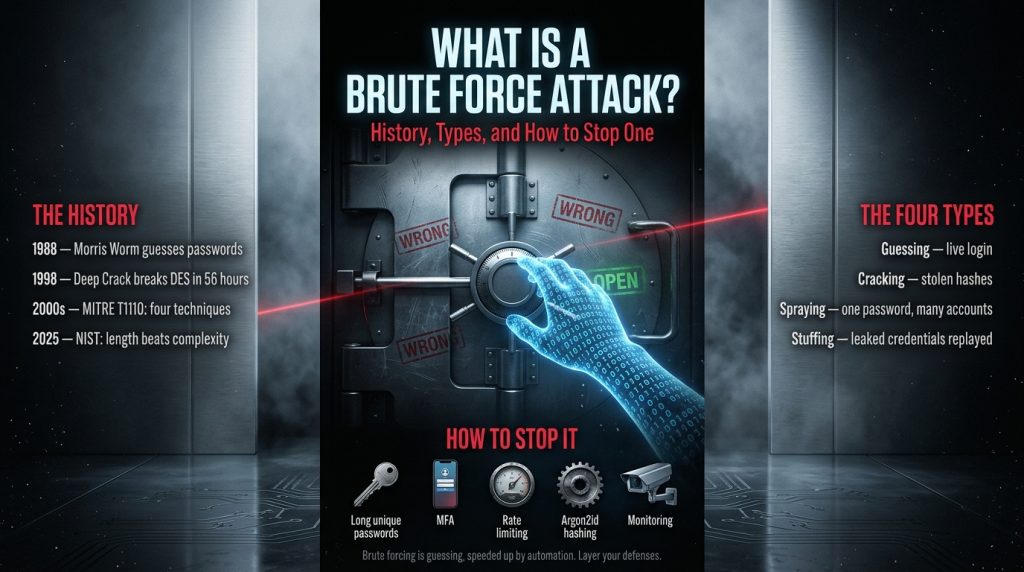
When you have tried entering the wrong password five times consecutively and were blocked, you have encountered the primary countermeasure to a brute force attack. This guide will walk you through the topic as I would like to have been walked through when I was first learning about it: what it is, its origin, its mechanics, and, most importantly, what can be done about it.
Quick answer
A brute force attack is a technique based on trial and error. The process involves trying out different values until one of them succeeds. In many cases, the victim of a brute force attack is a login. As per the Open Worldwide Application Security Project (OWASP), a brute force attack refers to the attacker trying out predetermined values, sending them through the request, and analyzing the response.
Importance #1: Solve the problem, defend yourself, and prevent an attack
Most people do not search this topic out of curiosity. They want to know what to do. So the practical part comes first.
If you are a normal user
- For each account you must have a unique and long password. The most important feature of a password is length; there is nothing special in the new guidelines of NIST (SP 800-63B-4), where the focus is made on length rather than complex forced rules.
- Use a password manager and therefore be able to have unique long passwords at all websites. According to NIST, websites should support password managers.
- Turn on multi-factor authentication (MFA) for your email, banks, social networks, and cloud accounts. If the attacker has guessed your password, he will not be able to enter the system, because MFA requires something else besides the password. MFA is not a silver bullet, since phishing is still possible; however, it stops the “guess and win” attack vector.
- Always create unique passwords. Password reuse is the main ingredient of credential stuffing.
- Do not use dictionary words or keyboard combinations as passwords.
- When you learn about a breach from some website, change this password and all other websites where you used it.
You run a website, app, or server.
- Limit attempts to log in incorrectly. Per the NIST SP 800-63B-4, there must be a limit to consecutive failures on an account of up to 100; most systems impose far lower numbers. Consider using temporary lockouts or increasing delays, not just permanent blocks, as attackers could easily lock legitimate users out.
- Rate-limit both by account and by source IP address. Limiting the rate by account will not prevent trying out a password from multiple accounts.
- Use blocklists when users set or reset their passwords. Per the NIST SP 800-63B-4, you should implement a blocklist of frequently used and compromised passwords.
- Hash passwords slowly with a modern algorithm. According to OWASP, use Argon2id with 19 MiB memory usage, two iterations, and one parallelism or bcrypt, scrypt, or PBKDF2, where needed, and avoid fast hashing algorithms like SHA-256 for passwords.
- Implement MFA for administrators first, then for everyone else.
- Monitor unsuccessful login attempts and detect any suspicious behavior. In case of Linux machines, the Fail2ban utility can be used to scan the logs and block IP addresses with excessive failed attempts by modifying the firewall settings.
- Login pages and administrative interfaces should not be released publicly without precautions. If possible, restrict access by network or allow-listing.
You think an attack is happening right now.
- See a lot of failed logins very rapidly, or the same password being used with many different user names.
- Implement rate limiting and temporary blocking.
- Reset the password and log out all active sessions where there is a login success after many failed attempts.
- Enable MFA for the impacted accounts.
- Review if the password hashes have been exposed or user details have been exposed; if yes, then you are now facing an offline attack, and you should require your users to change their passwords and see how the passwords are being hashed.
- If you are a user whose account has been hijacked, change your password from a trusted device and change it in all places where you used the same password.
What “brute force” means in plain English
Consider a bicycle lock that contains four digits in it. There are 10,000 possible combinations. And if you are patient enough, then you can try them all. That is what brute force means in the purest form: try everything that exists.
But when it comes to security, the hackers do not need to try all possibilities. They try the ones that have a greater probability of being true. The OWASP organization states that the hackers use dictionary attacks (which may be with mutations) or brute force attacks that work on character classes.
Two things decide whether guessing works:
- Guesses that can be made per second. A site that holds back your speed provides very few guesses, but a compromised password file that can be broken on the attacker’s machine provides a lot more.
- Search space size. The bigger the secret, the more possibilities there are.
A short history of brute force attacks
The idea is older than computers.
Exhausting all options is the fundamental principle of locks and codes; thus, there was never an inventor. The difference over time is only speed and automation.
1988: the Morris worm and weak passwords
A software called Morris Worm became widespread in November 1988 on a considerable portion of the young internet. It took advantage of several vulnerabilities. The course notes and secondary articles refer to one of them as using the built-in list of passwords, password variations of users’ names, and the system dictionary in order to guess passwords. The sources differ in regard to the size of the built-in list (numbers like 400 to 900 are cited), but what is clear is that it was a list of several hundred passwords. Weak and easily guessed passwords were common at the time.
1998: breaking DES with hardware
In DES, the encryption key had 56 bits, i.e., there were 2^56 keys available for encryption. As early as in February 1998, the distributed.net effort cracked a DES challenge within 39 days using the computing power of many volunteers’ computers. As late as in July 1998, the EFF’s specially designed machine, named Deep Crack, managed to crack another DES challenge within 56 hours. It is reported that the cost of building the machine was less than US$250,000. The objective of this machine was to prove that 56-bit keys were not secure anymore, and better encryption methods, such as triple DES, were recommended later.
This is brute force on encryption keys and is a different kind of brute force attack than cracking a website password because the target is different.
2000s to now: automation, leaked passwords, and categories
The rise of websites and remote logins (like SSH and remote desktop) led to brute force login attacks becoming more common. This is listed by MITRE ATT&CK under the heading T1110 Brute Force Attack, consisting of four techniques: password guessing, password cracking, password spraying, and credential stuffing. The same path was followed for defenses too.
2025: the guidance changes
NIST came up with SP 800-63B-4 in 2025. According to secondary sources, this regulation prioritizes password length rather than complexity requirements, mandates blocklist tests, and does not advocate for mandatory password renewal unless there is evidence that something has been compromised. This represents a drastic shift from the “every 90 days with a symbol” routine.
The four main types (MITRE ATT&CK categories)
| Type | What the attacker does | Where it happens | Best defenses |
|---|---|---|---|
| Password guessing (T1110.001) | Tries many passwords against a live login | Online | Rate limiting, lockout or delay, MFA, monitoring |
| Password cracking (T1110.002) | Tries guesses against stolen password hashes | Offline, on the attacker’s hardware | Slow hashing (Argon2id, bcrypt), unique salts, strong passwords |
| Password spraying (T1110.003) | Tries one or a few common passwords across many accounts | Online | Blocklists, source-based limits, MFA, monitoring across accounts |
| Credential stuffing (T1110.004) | Replays of real username and password pairs leaked elsewhere. | Online | Unique passwords, MFA, breached-password checks |
Others consider credential stuffing to be a distinct form of attack since it employs authentic leaked credentials rather than guesswork. MITRE categorizes credential stuffing as a brute-force attack; thus, this article will consider MITRE’s approach.
Why spraying avoids lockouts
The classic guessing technique attacks one particular account at a time, leading to a quick activation of lockouts. However, spraying works differently, as it makes a few attempts on a very large number of accounts. This is why per-account lockout is not sufficient.
Online versus offline attacks
This is the key point of the article and the one that breaking charts typically obscure.
Online attack: The attacker communicates with the legitimate login page or service. Each request goes through the target’s servers; thus, the target can slow, stop, log, and raise an alarm.
Offline attack: The attacker already possesses the stolen password hashes and makes guesses using his/her own machines. There is no login page that will slow the attacker down and no lockout. Even NIST’s own publications indicate that rate limiting and lockouts are ineffective for offline attacks, where the number of possible guesses per second depends only on the hash function used.
Thus, the password’s strength is important twice: in case of an online guessing attack and in case of a leak of the database.
The maths: why length wins
The number of possibilities is equal to the power of the number of characters to the length of the password. This is a tiny Python code which will give the possibilities. Below is the output of running the above code. The speeds mentioned are just examples.
import math

def fmt(seconds):
    units = [("years", 31557600), ("days", 86400), ("hours", 3600), ("minutes", 60)]
    if seconds < 1:
        return "under 1 second"
    for name, size in units:
        if seconds >= size:
            return f"{seconds/size:,.1f} {name}"
    return f"{seconds:,.0f} seconds"

cases = [("4-digit PIN", 10, 4), ("8 lowercase letters", 26, 8),
         ("8 chars from 94 printable ASCII", 94, 8),
         ("12 lowercase letters", 26, 12)]
rates = [("online, 10 guesses/s", 10), ("offline, 1e9 guesses/s", 1e9)]

for label, n, L in cases:
    total = n ** L
    print(f"{label}: {total:,} combos (~{math.log2(total):.1f} bits)")
    for rname, r in rates:
        print(f"   worst case, {rname}: {fmt(total / r)}")
Results for the worst case (trying every combination):
| Secret | Combinations | Online at 10 guesses/s | Offline at 1 billion guesses/s (fast hash, hypothetical) |
|---|---|---|---|
| 4-digit PIN | 10,000 | about 16.7 minutes | under 1 second |
| 8 lowercase letters | about 2.1 × 10^11 | about 662 years | about 3.5 minutes |
| 8 characters from 94 printable ASCII | about 6.1 × 10^15 | about 19 million years | about 70.6 days |
| 12 lowercase letters | about 9.5 × 10^16 | about 302 million years | about 3.0 years |
What this does and does not tell you:
- An increase in length increases the number of possible combinations faster than an increase in the number of characters used.
- This is because it is assumed that the attacker generates guesses randomly. People use easily predictable passwords, meaning that password guessing can happen much faster than in the worst-case scenario. The use of a list of common passwords helps in skipping the whole space.
- A memory-hard hashing algorithm like Argon2id greatly reduces the number of guesses per second from one billion to less. This is because the actual time depends on several factors; hence, all figures used are illustrative only.
- A 4-digit PIN is secure if and only if the system restricts the number of attempts.
How a defender slows guessing: a tiny simulation
Delays after failure is just one of the approaches that NIST suggests to decrease the risk of blocking a legitimate user. This program simply demonstrates delays; it does not actually login anywhere. The following output was generated by the program.
def delay_after(failures, base=1, cap=900):
    return min(base * (2 ** max(0, failures - 1)), cap)

for f in (1, 2, 3, 5, 10, 15, 20):
    total = sum(delay_after(i) for i in range(1, f + 1))
print(f, delay_after(f), total)| Failed attempts | Delay before next try (seconds) | Total waiting so far (seconds) |
|---|---|---|
| 1 | 1 | 1 |
| 3 | 4 | 7 |
| 5 | 16 | 31 |
| 10 | 512 | 1,023 |
| 15 | 900 (capped) | 5,523 |
| 20 | 900 (capped) | 10,023 |
At this rate, a guesser will have around 20 chances in about 2.8 hours rather than thousands of guesses per minute. This is just an example for teaching purposes, not a real system implementation. A real system would also need to guard against attacks that lock out legitimate users on purpose.
Defences explained, and their limits
Rate limiting and lockouts. They restrict the speed at which guesses may be attempted. Drawbacks: attackers can switch IP addresses, and permanent lockouts are too strict for attackers but lock real users out. CAPTCHA and longer waits between attempts are mentioned by NIST to mitigate that problem.
Complex, long, and unique passwords. They hinder brute-force and cracking attacks and stop credential stuffing attacks. Drawback: complex passwords do not protect against phishing or stealing via malware. Blocklists. They prevent users from using very common or breached passwords. Drawback: the blocklist should be up-to-date.
Multifactor authentication. A leaked password is no longer enough. Drawbacks: some multifactor systems can be phished and exploited, and implementation is important. Password hashing with slow algorithms. It defends against brute-force attacks after the breach by making them costly. Drawback: it cannot save a very bad password, since it is going to be guessed first.
Monitoring. An increase in failed login attempts, numerous login failures from one source, and successful logins after many failures are all indicators. Limitation: You need to actively monitor and react to them. The same observation was made in a conference paper published in 2021 analyzing the methods of protection against brute force attacks.
Common myths
- “Just add a symbol and I will be fine.” The guidelines for composition do not constitute the basis of NIST’s method anymore. Patterns used by substitution techniques such as “P@ssw0rd” can be guessed.
- “Account lockout protects all.” It does not protect from spraying, stuffing on multiple accounts or offline cracking attacks.
- “Attackers only target large corporations.” Automated guesswork is inexpensive for any exposed login. We cannot say that we found this exact percentage, since there was no way to check it.
- “Frequent password changes protect me better.” At present, the method of NIST is changing passwords in case of detected compromise, not regularly.
Is brute forcing legal?
Guessing passwords on computer systems that one does not own or has received permission to attack can land someone in legal trouble. The techniques mentioned above are applied by security experts in penetration tests and lab environments. This article is not aimed at teaching attackers how to attack systems.
Frequently asked questions
Can brute force attacks be totally avoided?
No. They can be made infeasible for all except a few attackers through control mechanisms.
Does long password mean better password?
Only when it is not guessable or not reused. The long and reused password gets exposed once and continues to remain exposed.
Passphrases are good then?
If they are long and not clichéd. Passphrases consisting of random words are more secure.
What’s the difference between brute force attacks and dictionary attacks?
Dictionary attacks involve guessable words while brute force involves trying every combination. Both the techniques are usually used together.
Key takeaways
- Brute forcing is guessing, speeded up by automation.
- The distinction between online and offline makes all the difference.
- Protect yourself using multiple defenses: unique long passwords, multi-factor authentication, rate-limiting, blacklists, slow hash functions and monitoring.
- “Cracking time graphs” are just illustrations. Actual cracking times depend on your hardware and chosen password.
Conclusion
Brute force attacks are not advanced exploits, but just plain guessing in an automated form. It all depends on only two things, whether the attacker is attempting an online or an offline attack based on a stolen password or hash, and whether your defenses will limit the guess rate. A 4-digit PIN with limitations on how many times it can be guessed is secure, while the exact same PIN would be instantly cracked from a compromised hash list.
This is precisely why there is no one solution to the problem. Long and unique passwords, multi-factor authentication, rate limiting, blocklists, slow hashing functions such as Argon2id, and constant monitoring all protect a different aspect of the issue. Together, they make an attack too costly for most of the attackers to carry out.
The most significant practical lesson learned here is that there is no need to understand the mathematics of search space in order to secure yourself from an attack; one simply needs the practices that prevent guesswork. This involves a password manager for users and strong passwords everywhere else along with MFA where possible. It includes NIST-compliant measures for system administrators: attempt limiting that does not lock out legitimate users, rate limiting by account and IP address, banning breached passwords, and slow hashing. Brute force attacks may never be made impossible, but layering of security measures may render them impractical.
Also Explore Our Cybersecurity Category. And if you are reading it up to here, leave a sweet comment to motivate us to write blog everyday.


