Introduction
Let’s be real. When someone mentions the “dark web,” what pops into your head? Probably a bunch of movie scenes: hoodies in dark rooms, shady online deals, mysterious people swapping secrets in some digital back alley. It’s always painted as this lawless, dangerous underworld.
But here’s the thing yeah, there’s some truth to that, but honestly, it’s a huge oversimplification. The real story is way messier. The dark web isn’t just a villain’s playground. It’s more like a weird, unpredictable crossroads. You’ll find a political activist dodging censorship right next to a scammer moving stolen credit cards. Same technology, totally different motives, sometimes just a click apart.
And it’s not just some techie niche. In a world where your data gets traded like baseball cards and every move online leaves a trail, knowing how the internet really works including the stuff most people never see matters. That’s digital literacy. So, forget the hype. This guide isn’t here to scare you. We’re going to look at what the dark web actually is, how it functions, why it even exists, and what all this means for your privacy and safety. No drama just the facts and a bit of clarity.
Let’s start with a fresh look at the internet. Not the scary shadows, but the real structure hiding in plain sight.
Part 1: The Geography of the Digital World – Icebergs, Layers, and Misconceptions
To really get the dark web, you’ve got to let go of the idea that there’s just “the internet” and that’s it. It’s not a single space. The internet is actually a bunch of layers, each with its own rules, doors, and reasons for existing.
The Flawed “Iceberg” Analogy (And Why We Still Use It)
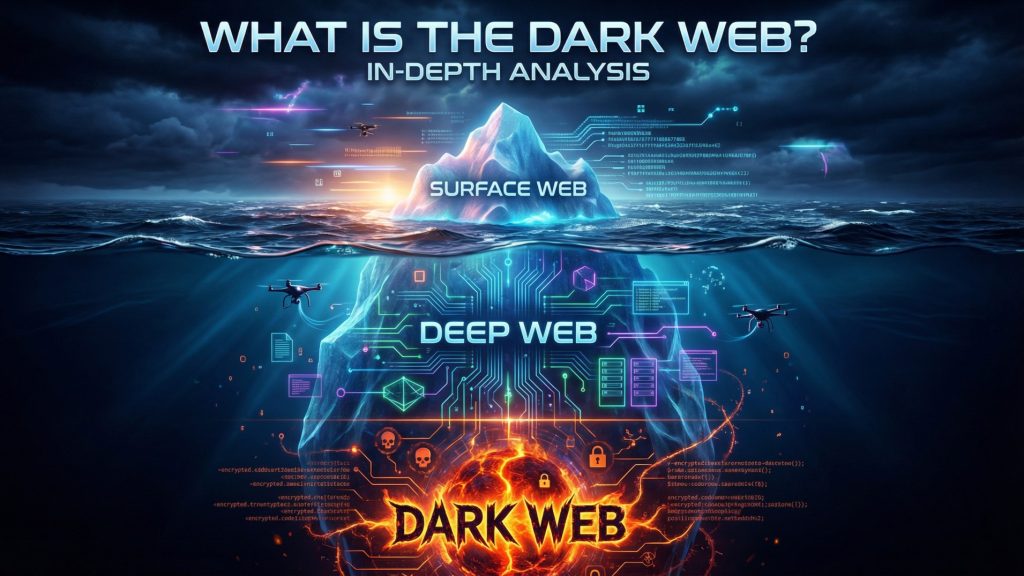
You’ve probably seen that iceberg graphic: a little tip poking out (“Surface Web”), a huge chunk under the water (“Deep Web”), and way at the bottom, a tiny dot labeled “Dark Web.” It’s not perfect, but it’s a decent place to start.
Here’s why it works: It shows scale and how much of the internet is hidden. Most of it isn’t just sitting there for anyone to stumble across. But here’s where it falls short: It makes the dark web seem like a secret basement. Really, it’s more like a parallel network that sits on top of the deep web, and you need special keys just to get in.
Let’s ditch the iceberg and draw a better map.
Layer 1: The Surface Web – The Public Park

- What is it? The part of the web anyone can access. If Google or Bing can find it, it’s surface web.
- What’s here? This is your everyday internet. News articles, Wikipedia, YouTube, social media, online shops, blogs, public forums, business sites. Stuff built to be seen, shared, and found by anyone.
- How do you get there? Just open your browser Chrome, Firefox, Safari, whatever. No weird settings or secret codes.
- How big is it? Honestly, smaller than you’d think. All those familiar sites add up to only about 4-10% of the whole internet.
- Real-life examples: You’re reading this post. You Google a dinner recipe. You watch a TikTok. You book a flight. That’s all surface web. And yeah, you’re being tracked cookies, IP addresses, logins, the works.
Layer 2: The Deep Web – The Private Property

This is where things usually get mixed up. The deep web isn’t the same as the dark web. Basically, it’s everything online that you can’t just stumble upon with a Google search.
What does that mean? It’s any online content tucked behind a login, a paywall, or just not linked in a way search engines can find. If you need a password, a special link, or access through a private network, you’re in the deep web.
This is the space where most of your personal digital life happens. Think about your Gmail inbox, your Amazon orders, private messages on Facebook, even your work’s internal SharePoint or a paywalled academic journal. Your online banking, your doctor’s patient portal, government databases, company intranets this is all the deep web. Even stuff like a travel site showing you custom search results counts.
Getting in isn’t dramatic. Most of the time, you just log in with a username and password, click a private link, or use your company’s VPN. There’s nothing shady about it. It’s just not open for the world to see.
Here’s the wild part: the deep web makes up about 90 to 96 percent of the internet. Most of what you do online checking your work email, looking at your credit card statement, reading a report behind a paywall, working on a shared Google Doc draft that’s all deep web activity. It’s private, but you still use the regular internet to get there.
Layer 3: The Dark Web – The Masked Ball

Now we’re getting to the part people love to talk about. The dark web is just a small corner of the deep web, but it’s different because it’s built for anonymity.
Here’s what that actually means: The dark web sits on special encrypted networks. People use it to hide not just who’s visiting, but where the sites are hosted. Everything is designed to keep both sides in the shadows.
You can’t get to the dark web with Chrome or Safari. You need special tools, like the Tor Browser, and you usually need to know the exact address you’re looking for. It’s not something you’ll just trip over.
How big is it? Tiny. The dark web is a sliver of the internet maybe 0.01 percent. It’s not about size. It’s about how it works.
Here’s the difference: The deep web is about privacy. You keep your stuff locked up behind a login. The dark web is about anonymity nobody knows who you are or where you’re connecting from.
A Better Analogy: The City
Think of the surface web as the city’s public parks and main streets open, easy to find, mapped out for everyone. The deep web is like private homes, office buildings, and bank vaults. You need a key or an invitation, but they’re still built along the main roads. The dark web? That’s a hidden world of secret speakeasies and unmarked rooms. You need a password, directions to a hidden door, and once you’re inside, everyone’s wearing a mask and nobody even knows where the room is.
Part 2: The Technology of Anonymity – How the Dark Web Actually Works
The dark web isn’t some kind of wizardry. Its secrecy comes from a clever mix of decentralized tech and a lot of careful planning. If you really want to get its culture, you need to understand how it’s built under the hood.
The King of the Hill: The Tor Network
Let’s talk about “The Onion Router,” or Tor. This is the top dog when it comes to getting onto the dark web. Funny enough, the U.S. Navy started building it back in the ’90s to keep their own messages secret.
How Tor Works: The Onion Analogy
Picture this: you want to send a secret letter, but the regular mail tracks both where it came from and where it’s going. Tor flips that on its head.
Here’s how it goes:
- The Onion Letter: You write your message let’s say it’s a web request. Then you stick it inside three envelopes, one inside the other.
- Encryption Layers: Each envelope has its own address and its own lock. Only the right person can open the right layer.
- The First Courier (Entry/Guard Relay): You give your triple wrapped letter to a random courier. They only have the key for the outermost envelope. They open it, see where to send it next, and toss the first envelope. They know who you are, but not what’s inside or where it’s really going.
- The Second Courier (Middle Relay): The first courier hands the double wrapped letter to a second, random courier. This courier only knows how to open the next layer. They see who gets it next and send it along. They don’t know where it started or where it’ll end up.
- The Third Courier (Exit Relay): Finally, the third courier gets the last envelope. They have the last key, open it, and see the final destination—like facebook.com. They deliver the message, but have no clue who sent it in the first place.
What’s actually happening?
- Your data gets wrapped up in several layers of encryption.
- It bounces through at least three random servers (called “relays”) run by volunteers all over the world.
- Each relay peels off just one layer, revealing only where to send it next.
- No single relay ever knows both where the message started and where it’s ending up.
.onion Addresses: The Hidden Doors
You won’t find dark web sites at places like www.amazon.com. Instead, you get .onion addresses a jumble of 16 to 56 random letters and numbers, ending with .onion. For example, if you want to use DuckDuckGo’s dark web search, you’d have to find their .onion address. https://duckduckgogg42xjoc72x3sjasowoarfbgcmvfimaftt6twagswzczad.onion
These addresses basically prove themselves. The .onion address is actually a cryptographic hash of the site’s public key. When you connect with Tor Browser, it sets up an encrypted, secure link inside the Tor network itself. No exit relay touches the traffic, so your connection never leaves that safe Tor circuit. That’s why .onion sites are so much more private and secure for both you and whoever’s running the site.
Beyond Tor, there are other tools out there if you want anonymity online.
I2P (Invisible Internet Project) is one of them. It’s more about building a hidden network a darknet. I2P is tuned for creating and accessing internal services (“eepsites”) that stay inside I2P. If Tor helps you reach the regular internet anonymously, I2P is more about offering and using services built just for I2P. It uses something called “garlic routing.” That means it bundles together a bunch of messages, each with its own delivery info, which can make things faster and, in theory, more secure for peer to peer use.
Then there’s Freenet. This one’s all about censorship resistant publishing. It’s a peer-to-peer system where you offer up some of your hard drive as a piece of a giant, encrypted pool of data. Nobody controls the whole thing; the files are spread across the network. If someone publishes something on Freenet, removing it is next to impossible because there’s no single point you can take down.
Now, the real backbone of Tor is its relays and the volunteers running them. Tor works because thousands of people around the world donate their bandwidth and run relays. There are different kinds:
- Guard or entry relays: They’re the first hop and need to stay fast and reliable.
- Middle relays: They keep the data moving and help keep everything private.
- Exit relays: These are risky to run. They’re the final connection to the wider internet, so if anything shady happens, that operator’s IP address gets the blame. Spam, attacks, you name it sometimes the exit relay operator gets legal threats.
Here’s the catch. Tor’s strength being decentralized and volunteer based also opens the door to problems. Anyone can join, including bad actors. If someone runs enough relays, they boost their odds of spying on traffic. That’s the constant tension with Tor.
Part 3: The Moral Spectrum – A Tour of Dark Web Content (The Good, The Bad, and The Ugly)
This is where things get interesting. The dark web is really just a tool for total anonymity. Like any tool a hammer, a kitchen knife, the internet itself how people use it is what matters.
Section A: The Light in the Dark – Legitimate and Socially Positive Uses
You almost never hear about this part in the news, but for a lot of people, the dark web is a lifeline.
- Whistleblowing & Secure Leak Submission: Major news outlets and activist groups run .onion portals. SecureDrop, for example, is open-source and used by places like The New York Times, The Guardian, The Washington Post, and more. Sources can upload files and talk to reporters without much risk of getting caught by bosses or governments. In places where journalism can get you jailed or worse, this is essential.
- Circumventing Censorship & Surveillance: If you live in China, Iran, Russia, Belarus anywhere with heavy censorship the dark web is sometimes your only window to the outside. It lets people read real news, banned books, and reach global social media. Political organizers can work together without state eyes watching their every move.
- Privacy for the Vulnerable:
- Domestic Violence Survivors: Someone planning to escape abuse can look up shelters, legal help, and safety tips without leaving a digital trail their abuser might find.
- Political & Religious Dissidents: Activists in hostile countries can organize, share info, and connect with the world outside.
- Marginalized Communities: In places where being LGBTQ+ is illegal, folks can find support, community, and advice without putting themselves in danger.
- Law Enforcement & Intelligence Operations: Agencies like the FBI and Europol are on the dark web, too. They go undercover to break into criminal markets, follow the money, track organized crime, and gather intel on terrorists. Sometimes they take over malicious servers “sinkholes” to disrupt botnets.
- Academic & Cybersecurity Research: Researchers dig into dark web markets to learn how cybercrime works, follow malware evolution, and spot trends in illegal trading. This kind of research is crucial for building better cybersecurity and making smarter policies.
- Everyday Privacy Advocacy: People turn to Tor for lots of reasons. Some just want to dodge creepy ads that follow them around online. Others don’t want their internet provider snooping on every site they visit. Sometimes, it’s about getting past those annoying location blocks like reading news from another country without getting filtered or stopped.
Section B: The Murky Middle – The Grey and Black Markets
This is the part everyone hears about: the digital underworld where people buy and sell just about anything you can imagine. These markets aren’t as chaotic as you’d think they’ve got their own rules, reviews, even customer support forums. Honestly, it’s not much different from shopping on eBay, at least on the surface.
Here’s how a typical dark web market works:
- Vendor Shops: Individual sellers, or sometimes whole groups, set up their own mini stores.
- Escrow System: When you buy something, the site holds your cryptocurrency until you say you got what you paid for. It’s their way of making sure nobody gets ripped off.
- Feedback and Ratings: Buyers rate sellers on stuff like how good the product is and whether it actually shows up. Good vendors brag about their ratings.
- Forums: People swap tips, argue over deals gone bad, or just hang out. Sometimes you’ll find guides or even people settling disputes.
- Tumbler/Mixer Services: These scramble your crypto transactions, making them harder to trace.
So, what’s for sale? Here’s a quick breakdown:
Digital Contraband:
- Stolen Data: This is big business. You’ll find everything from credit card “dumps” (the info stored on the magnetic strip), CVV2 numbers, bank logins, PayPal accounts, even streaming service passwords by the bundle.
- Malware & Cybercrime Tools: If you want it, it’s there. Criminals with no tech skills can rent “Ransomware as a Service,” or pick up ready made phishing kits, remote access trojans, botnet rentals, and even zero day exploits.
- Forged Documents: Fake passports, driver’s licenses, diplomas, utility bills the fakes can be scarily good.
Physical Contraband, Delivered Digitally:
- Narcotics: Think of it as drug dealing for the digital age. Cannabis, opioids, LSD, prescription pills you name it. Vendors love to brag about their “stealth shipping” tricks.
- Firearms & Weapons: Not as common (too risky and complicated to ship), but you’ll still see listings for guns, ammo, sometimes even explosives.
- Counterfeit Goods: Knockoff luxury watches, handbags, fake currency, electronics the usual suspects.
Case Study: The Rise and Fall of Silk Road
You can’t talk about dark web markets without mentioning Silk Road. Ross Ulbricht better known as “Dread Pirate Roberts” launched it in 2011. It was basically Amazon for drugs, running on Bitcoin and Tor. The FBI shut it down in 2013, and Ulbricht is now serving two life sentences. So, what’s the takeaway? Anonymity isn’t bulletproof. Ulbricht slipped up using his real email on public forums, screwing up server security and that’s what brought him down. Since then, law enforcement keeps getting better at tracking these markets, but every time one falls, another pops up. AlphaBay, Hansa, Wall Street Market the cycle keeps going.
Section C: The Abyss – Truly Malicious and Harmful Content
This is where things get ugly. Anonymity on the dark web can bring out the absolute worst in people. I’m not here to shock anyone or sensationalize, but it’s important to look at this stuff honestly—because the damage is real, and it’s exactly why law enforcement gets involved.
- Extreme & Illegal Content: Some sites deal in child sexual abuse material. You won’t find these by accident; they’re buried deep, hidden behind layers of secrecy, invite-only access, and heavy vetting. Law enforcement groups like those behind Operation Pacifier have tracked these networks down, sometimes by actually taking over their servers and combing through their user lists.
- Hacking-For-Hire & Violent Services: You’ll see offers for “contract” hacking—like, “I’ll break into your ex’s email for $500.” Most of these are scams. More disturbing are the rare listings for physical violence. Are these real? Probably not, but authorities still have to take every lead seriously, and that means a ton of investigative work.
- Terrorist Propaganda & Recruitment: Extremist groups have used the dark web for spreading propaganda, talking securely, and raising money through crypto. But honestly, most of their activity still happens on encrypted messaging apps and regular social media.
A Critical Reality Check on Access: Let’s be clear you’re not going to stumble across the darkest stuff by poking around. It’s not floating around on public directories like the Hidden Wiki. You need to be invited, vetted, and accepted into closed circles. Most people never see any of it.
Part 4: A Hands-On Exploration: A Step-by-Step Guide (For Educational Purposes Only)
⚠️ SERIOUS WARNING & DISCLAIMER ⚠️
This guide is just for educational understanding don’t take it as a “how-to.” The risks are very real:
- Legal Risk: Depending on where you live, just visiting some sites is illegal. Downloading certain material is a serious crime.
- Security Risk: You’re a target the second you’re online. Malware, phishing, exploit kits they’re everywhere. One wrong click and your computer’s toast.
- Psychological Risk: You might see things you can’t unsee. Some of it’s disturbing, illegal, or just plain traumatizing.
- Scam Risk: Almost everything’s a scam. Trust is not part of the equation.
If you’re researching, be absolutely careful. Don’t use your personal computer or home internet. Think about using a dedicated, air-gapped machine, or at least a secure virtual machine.
Phase 1: Fortifying Your Digital Persona (The “OPSEC” Setup)
OPSEC stands for Operations Security it’s all about protecting your identity and your data.
- The Machine: Start with a clean computer. Even better, use a Live OS like Tails, booted from a USB stick. Tails runs everything through Tor, wipes itself clean after you shut down, and includes security tools right out of the box.
- Network Obscuration:
- Public Wi-Fi: Don’t do it. It’s usually insecure and might be monitored.
- Home Wi-Fi: This ties your activity directly to your ISP account. Not good.
- Trusted VPN: This one sparks debate. A strict no-logs, paid VPN (like Mullvad or IVPN), used before you open Tor, can stop your ISP from seeing you’re using Tor. But now you’re trusting the VPN instead. The Tor Project says for most people, Tor alone is enough a VPN can actually hurt your anonymity if you don’t know what you’re doing. If you’re unsure, skip the VPN.
Phase 2: The Gateway – Installing and Configuring Tor Browser
- Download Tor Browser, and only get it from the official Tor Project website (https://www.torproject.org). Don’t trust any third-party sites those are probably sketchy or outright dangerous.
- Install it like you would any other app.
- First time you open it, you’ll probably see a connection screen. Just hit “Connect.”
- Don’t get distracted go straight to Security Settings. Click the little shield icon near the address bar.
- Crank the Security Level all the way up to “Safest.” This kills JavaScript, fancy fonts, and a bunch of other stuff that websites use to track or hack you. Tons of sites will break and look awful. That’s the idea. You’re here for anonymity, not convenience.
Phase 3: Navigation – Finding Your Way in the Unmapped
You can’t just Google “.onion sites.” That won’t work. You need to dig for directories and links.
- Start with some .onion sites you know are real:
- DuckDuckGo Search: https://duckduckgogg42xjoc72x3sjasowoarfbgcmvfimaftt6twagswzczad.onion
- The Tor Project’s own site: http://2gzyxa5ihm7nsggfxnu52rck2vv4rvmdlkiu3zzui5du4xyclen53wid.onion
- ProtonMail for secure email: https://protonmailrmez3lotccipshtkleegetolb73fuirgj7r4o4vfu7ozyd.onion
- Directories (tread carefully here):
- The Hidden Wiki. This isn’t just one page it’s a concept, and the addresses change all the time. It’s basically a messy list of links, split up by topic. Most links are dead, and a lot lead to scams or illegal junk. Think of it as digital archaeology, not a reliable guide.
- Daniel’s Onion Link List. Another crowdsourced directory of .onion URLs people always mention.
- What’s the experience actually like?
- It’s painfully slow. Every site takes forever to load because of all the encryption and relays.
- Websites look busted like something straight from the ‘90s, just walls of text and basic HTML.
- Almost every link you click goes nowhere. Dead ends are the norm here.
- You’ll probably feel paranoid. That’s normal. In fact, the sense of unease is part of the design don’t ignore it.
Phase 4: The Reality of Markets and Forums (A Theoretical Look)
Let’s say you somehow stumbled across a “market” (don’t). Here’s how it usually plays out:
- You find a current, working .onion link maybe from a clearnet forum that tracks dark web news, or from a site like Dread on Tor itself.
- You sign up with a totally new username, nothing that ties back to you.
- The site gives you a unique Bitcoin or Monero address. You send crypto there, and it shows up in your account.
- You browse listings product descriptions, vendor ratings, prices all in crypto.
- You pick something, give them a delivery address (usually fake name, safe drop spot), and your money goes into escrow.
- When your stuff arrives (if it does), you release the money to the seller and maybe leave a review.
Why is this almost always a terrible idea? Besides the obvious (it’s illegal), exit scams are everywhere. One day the market owner just vanishes and takes every escrowed coin with them millions, gone. You can’t do a thing about it.
Part 5: The High-Stakes Cat-and-Mouse Game: Law Enforcement vs. The Dark Web
Let’s clear something up: the dark web isn’t some wild, lawless wasteland. It’s actually the front line in a constant battle between cybercriminals and law enforcement.
How Law Enforcement Fights Back
- Undercover Operations: Agents don’t just lurk they build fake identities, embed themselves into shady forums and markets, and slowly earn trust. This takes months, sometimes longer, just to collect the evidence they need.
- Blockchain Analysis: Bitcoin isn’t as anonymous as people think. Every transaction leaves a public trail on the blockchain. Companies like Chainalysis follow this trail, grouping wallet addresses and tracking money as it moves especially once it hits a regulated crypto exchange. That’s why privacy coins like Monero (XMR) have become the go-to on dark markets.
- Exploiting OPSEC Mistakes: Criminals slip up all the time. They recycle usernames, accidentally log into personal accounts, brag on public forums, or just get sloppy with their servers. Remember Silk Road? Ulbricht got caught partly because of a random Stack Overflow post where he talked about his code.
- Malware and Hacking: Some agencies don’t just wait around they hack back. Legally. They’ll use malware or special network tricks to unmask users. In Operation Pacifier, the FBI took control of a CSAM site and hit visitors with malware that grabbed their real IP addresses.
- International Collaboration: Cybercrime ignores borders, so the cops have to team up. When they took down Wall Street Market in 2019, German, U.S., and other European authorities all worked together.
- Controlled Delivery: For drugs or other physical stuff, law enforcement might intercept a package, swap out the illegal goods, and then deliver it anyway just to watch who picks it up and make arrests.
The Never-Ending Game: The “Hydra Effect”
Every time law enforcement takes down a big market AlphaBay, Hansa, you name it the dark web just adapts. It’s like a living, breathing thing that refuses to die.
- A new market pops up and takes off.
- It grows, gets popular, and grabs the attention of law enforcement.
- Sooner or later, they shut it down.
- The users scatter to smaller, newer markets.
- One of those markets gets big, and the cycle starts again.
Cops catch people and wipe out platforms, but the dark web itself keeps going.
Part 6: Your Data on the Dark Web – Proactive Defense in a Breached World
Here’s the tough truth: you don’t have to visit the dark web for your personal info to end up there. If you’ve got an online account, there’s a good chance parts of your digital life are floating around for sale.
How Your Data Ends Up There: The Theft Supply Chain
- Major Data Breaches: Hackers hit big companies think Equifax, LinkedIn, Marriott and walk away with millions of user records. Those databases get bundled up and sold as “combo lists,” packed with emails, hashed passwords, phone numbers, and addresses.
- Phishing & Malware: Sometimes, you’re tricked into handing over your login info. Other times, malware like keyloggers just snatch your credentials right off your device.
- Credential Stuffing: Attackers use automated tools to throw stolen username and password combos at hundreds of sites, banking on the fact that most people reuse passwords everywhere.
Practical Self-Defense: A 10-Point Action Plan
Assume you’ve already been compromised. Act like it.
- Breach Awareness: Head over to haveibeenpwned.com every so often and check your emails and phone numbers. Find out where your info’s leaked.
- Password Manager No Excuses: Pick a solid password manager (Bitwarden, 1Password, KeePass, whatever works for you). Make every account’s password long, random, and most important completely different. This alone shuts down credential stuffing attacks.
- Two-Factor Authentication (2FA) Also Non Negotiable: Turn on 2FA everywhere. Don’t rely on text messages they’re easier to hijack. Use an authenticator app like Google Authenticator, Authy, or Aegis.
- Credit Freeze Beats Monitoring: Call Experian, Equifax, and TransUnion. Freeze your credit. Nobody, not even you, can open new credit lines until you unfreeze it. It’s free, and way more effective than those paid credit monitoring services.
- Email Hygiene: For your important accounts, use a unique email alias. Most email services and password managers make this easy. It’s one more wall between you and cross-breach attacks.
- Software Updates: Don’t ignore those update prompts. Keep your operating system, browser, and apps up to date. Most malware just takes advantage of stuff that’s already been patched.
- Stay Skeptical of Phishing: If an email, text, or call comes out of nowhere asking for info or pushing you to act fast, stop and verify it through another channel you trust.
- Think About Identity Theft Protection: If you’ve got a lot to lose, or you’ve been targeted before, consider one of those identity recovery services from your bank or a reputable provider. Sometimes it really helps if things go sideways.
- Review Financial Statements: Actually read your bank and credit card statements every month. Look for anything weird, even small charges.
- Digital Minimalism: The less you share, the safer you are. Before you fill out a form or sign up for something, ask yourself do I really need this?
Part 7: The Philosophical Core – The Unresolvable Tension
The dark web puts us face-to-face with one of the biggest headaches of our digital era.
Privacy vs. Security vs. Freedom.
The Libertarian/Privacy Advocate View: The dark web matters. It’s a last line of defense in a world where both governments and corporations seem hell-bent on knowing everything about us. Tools for true anonymity protect free speech, dissent, and the idea that you can have a private life. The old “nothing to hide, nothing to fear” line? That’s just a trap that leads straight to tyranny.
The Law & Order/Security View: But let’s be real anonymity also gives cover to some awful people. Predators, terrorists, and criminals use it for child exploitation, drug sales, and far worse. There’s a real cost, and society can’t just shrug and let people get hurt. Sometimes, protecting people means giving up on perfect digital anonymity.
The Technological Realist View: And then there’s reality. The math behind all this the cryptography can’t be erased. No law will make it disappear. If you try to ban it, you’ll just drive regular folks underground and leave the worst criminals even harder to catch. Better to focus on harm reduction, smarter investigations, and actually fixing the reasons people turn to crime in the first place.
There’s no tidy solution. The dark web is where this all comes to a head a space where one tool can save a dissident’s life or sell a deadly drug, all in the same breath.
Conclusion
Here’s the thing: the dark web isn’t just some shadowy corner of the internet. It’s a mirror. It throws our best and worst traits right back at us, no filter.
You see our hunger for privacy there because honestly, who isn’t sick of being watched all the time? You see the way we don’t always trust big institutions or people in charge. The dark web’s packed with reminders of global inequality, too, since those gaps fuel black markets. And let’s not ignore it: the demand for illegal stuff is everywhere. Sometimes, the worst side of humanity shows up, plain and simple.
Getting what the dark web is about isn’t just knowing how to hop between secret sites. It’s about seeing what technology is doing to our world, how every convenience comes with a trade-off, and how messy, complicated human nature always finds a way out in the open or hidden away.
The dark web’s future is tangled up with the internet’s future. As encryption gets easier, as privacy coins change the game, as surveillance tools get sharper, the dark web will keep shifting. The real question isn’t whether it sticks around. It’s how we deal with the tough choices and weird protections it brings to the table. That’s on us.
Explore Our Cybersecurity Category