As soon as you get involved in programming, you might have heard something about object-oriented programming, or OOP, for short. And maybe you thought that it was a very complicated and sophisticated concept. Someone mentioned to you “classes,” “objects,” and “inheritance,” and suddenly you couldn’t understand what was happening.
But actually, it’s not so complicated. Object-oriented programming is merely the process of organizing the code in a way that makes it more tangible and understandable, rather than abstract.
Consider your wardrobe. Do you put all your clothes—shirts, pants, shoes, belts, everything—into one big heap? Of course not, because you have categories, and each thing has its place and usage purpose. That’s how OOP works.
Now let’s consider object-oriented programming in plain English.
Why Does OOP Exist?
During the initial stage, the programming was linear, i.e., you would write one line, followed by another and the next until all were done—like writing an agenda or a grocery list. This may work fine for a small program, but when programs became thousands or millions long, things got messy. Changing one line led to some error occurring a thousand lines away.
The solution came via object-oriented programming, whereby the information and the behavior of the system were packaged as objects. Thus, each object took care of its own information. In case you needed any correction, you opened up only the concerned objects.
Simple Definition: OOP is an approach to programming wherein your program is modeled around a number of independent "objects" that have their data/functions.The Core Building Blocks – Explained With Everyday Examples
1. Classes and Objects – The Blueprint and the Actual Thing
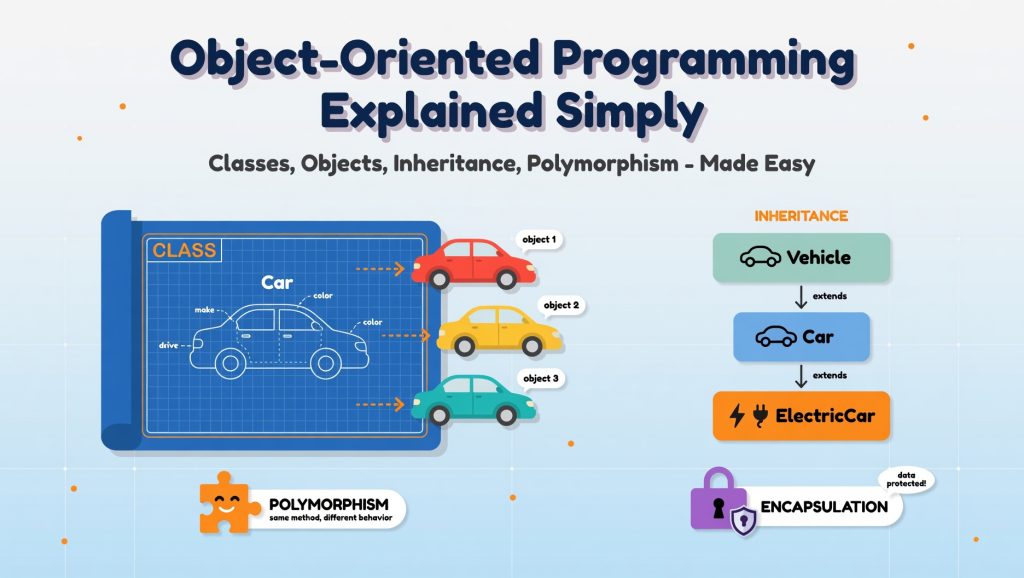
A class acts as a template or blueprint. The object is an entity created using the blueprint.
- Example: The class Car could have the following attributes for each individual car: the car has a steering wheel, an engine, and its color. In addition, a car can drive, stop, and beep.
- The individual entities (or objects) here are actual cars like your neighbor’s red Tesla, a yellow taxi, and a police car. While they follow the blueprint, they differ in their attributes.
In programming languages, the class determines the attributes and methods of the object.
Real-life example: Assume you are in charge of a toy manufacturing company. The company has a mold of “robot toy.” The mold does not do anything. However, when the molten material is poured inside, you will have a Robot Toy that can move and possibly make some sound.
2. Attributes and Methods – What an Object Knows and Does
- Properties describe the characteristics or features of an object. A Dog object could have the following properties: breed, age, and name.
- The method defines what actions the object can execute. For example, the Dog object could use such methods as bark(), wag_tail(), and eat().
It doesn’t matter how the dog barks because you only should make a call to dog.bark().
3. Encapsulation – Keeping Secrets Inside
This is a big word for “hiding the nasty details.”
Driving a car, you interact with its steering wheel, pedals, and gearshift. You don’t care about how the engine combusted or the fuel injection took place. That information was encapsulated under the hood.
In OOP, encapsulation is about wrapping the attributes of an object and restricting access to its components. Some attributes will be public (visible to any external method), while others will be private (accessible only within the object itself).
Advantage: The internal mechanism can be changed without impacting the user's interaction with the object. The code becomes easier to modify.Analogy to radio: Consider a restaurant kitchen. For you, the client, there’s only one thing to do: order a meal from the menu. You never go into the kitchen and adjust the oven temperature. That’s done by kitchen staff. If the chef modifies his soup recipe, you don’t have to know—your soup gets better.
4. Inheritance – Passing Down Traits
Inheritance is a concept where a new class can inherit properties and methods of an existing class. This is like passing traits through genetics.
- Parent class (superclass): has
eat()andsleep(). - Child class (subclass):
Catinheritseat()but addsmeow(). - Another child inherits but adds
bark().
There is no need to write separate eat() and sleep() functions for all animals. You simply inherit an animal.
Real-world example: Let us consider that you are making a video game where you have the character class with properties like health and location along with a move() function. Now you derive classes like Wizard, Archer, and Knight from Character.
5. Polymorphism – Many Forms, One Interface
This is one that can be hard to say, but easy to implement. “Poly” means many; “morph” means shape. Same name for the method, just different behaviors.
- You tell all shapes to
draw(). - A
Circledraws a circle. - A
Squaredraws a square. - A
Triangledraws a triangle.
It doesn’t matter what shape it is; you simply say shape. draw(). Each object has its own way to do this.
Example in real life: Start button in your car. Press it in a gasoline-powered car – the engine starts. Press the start button in the electric car—batteries activate. Same interface; different implementation. And it makes no difference to you.
A Concrete Code-Like Example (Without Scaring You)
Let’s say you’re modeling a bank account system. You create a BankAccount class with:
- Attributes:
accountNumber,balance - Methods:
deposit(amount),withdraw(amount),getBalance()
Encapsulation makes sure that nobody will be able to tamper with the balance unless they use deposit and withdraw. One could define such a rule, like “withdrawals can’t exceed $1,000,” within the method itself—without altering any other code.
The next step would be using inheritance to create SavingsAccount (has an interest rate) and CheckingAccount (has an overdraft penalty). Using polymorphism, we can run the method yearEndProcess() against any of those accounts; each will handle the call differently.
No spaghetti code. No searching for balance modifications. Pure and clear.
Does Every Language Use OOP?
OOP is supported by almost all the widely used programming languages today: Java, C++, C#, Python, JavaScript (yes, even JavaScript), Ruby, PHP, Swift, and Kotlin.
Some are pure OOP languages (everything is an object, like Java, or Smalltalk). Some are multi-paradigm languages (such as Python and JavaScript); you can write OOP code or code in another paradigm. While OOP might not be the best option for short scripts, it’s indispensable for medium to large programs.
Where OOP Shines (And a Warning)
Great for:
- Collaborative programming for big teams (everyone is assigned to their own objects)
- GUI software (buttons, windows, menus are natural objects)
- Game creation (characters, inventory, levels)
- E-commerce (User, Product, ShoppingCart, Order)
- Any software dealing with real-world entities
Not always ideal for:
- Small-scale scripting (write an ordinary function)
- Efficient numeric calculations (OOP can slow down scientific computing)
- Purely functional transformations of data
Common Beginner Mistakes (And How to Fix Them)
- Placing everything into a single huge object—That completely misses the point. Separate things. A User object shouldn’t be responsible for writing to files or accessing the network.
- Inheritance is used too much—Just because Pizza and Drink can both be considered “menu items” doesn’t mean they should inherit from MenuItem if they have nothing in common. Composition (an object containing other objects) can sometimes make more sense than inheritance.
- Using public accessors everywhere – This results in breaking encapsulation and making code vulnerable. Does any external code need to access this property? Then it shouldn’t be exposed.
- Confusion between classes and objects – A class represents the concept, while an object is its concrete implementation. “Human” is a class. human1 = Human(“Alice”) is an object.
Quick Comparison: OOP vs. Procedural (In One Table)

How to Start Thinking in Objects
Next time when you look at anything in the real world, ask the following:
- Properties? (such as Title, Author, and Page count for a book)
- Behaviors? (Open, Close, Turn Pages)
- Type? (Maybe could be a subclass of Media alongside Movie and Music Album)
- Which attributes should be kept private? (page counting mechanism within, possibly even the glue that binds it)
Practice that for five minutes a day – on a coffee mug, on your phone, on a bus ticket. That’s OOP thinking.
A Final Realistic Example: A Library System
When using OOP, there may be an array for books and another array for members along with the functions that use IDs. One wrong move could see a book being issued more than once.
Using OOP:
Book(title, author, isCheckedOut)Member(name, memberID, borrowedBooks list)Library(list of books, methodcheckOut(member, book))
The Library Class makes sure that a book is never issued twice. The member class keeps a record of all its own issued books. All classes can stand alone for testing purposes. If you want to use digital books that derive from books with a download link, you simply extend it.
Conclusion
It’s also not necessary to use OOP for everything; there will always be times where procedural programming is preferable. However, understanding OOP forces you to see problems differently. You shouldn’t try to remember the four main elements of object-oriented programming (encapsulation, inheritance, polymorphism, and abstraction). Instead, ask yourself whether you can model the problem as entities interacting with each other without stepping on each other’s toes.
Start small. Take any simple task (e.g., making a to-do list) and implement it with one or two classes at first. Then add another class and try to break your solution. And fix it. This was how everyone got started – through trial and error, rather than theory.
Next time, try modeling your coffee preparation as an object. What attributes does it have? Temperature, maybe? The amount of caffeine? Any methods? sip(), maybe, or refill()?
Explore Our Programming Category