As you begin coding, one of the first concepts you will come across is the concept of a variable. This might sound complicated, but in reality, this is a very simple and practical programming concept. If you understand how to use variables, you can start to write programs that store data, manipulate data, and perform practical functions.
This article describes what a variable is, how to define one, and what mistakes to avoid when working with variables. I will use Python and JavaScript as examples since they are easy for beginners and popular languages. I haven’t run any of the code snippets given in this article session.
What is a variable?
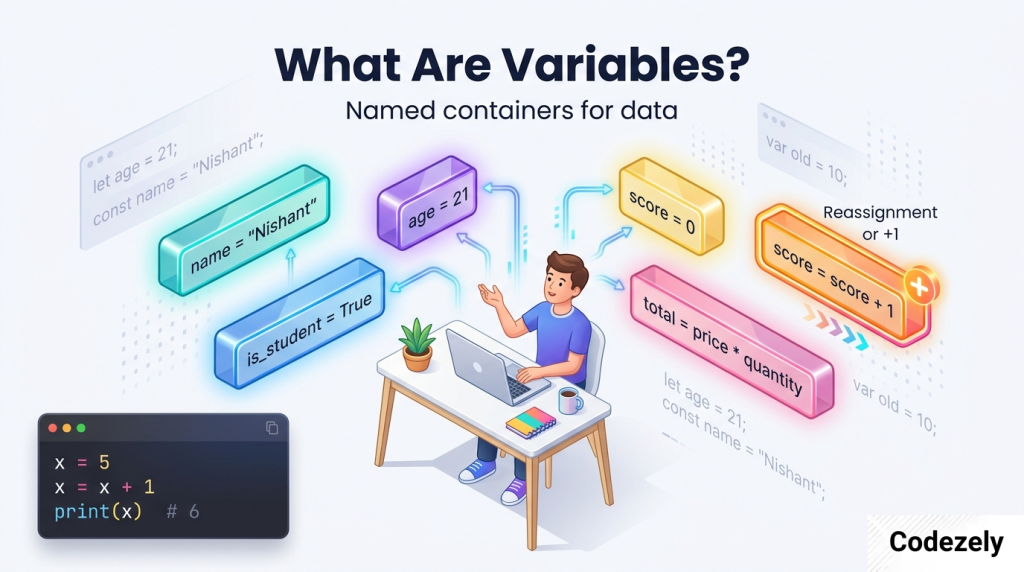
A variable is an identifier for a value. This is the most basic definition of a variable. Consider a variable to be a labeled box. You fill the box with some value, write a label to it, and at a later point, you can retrieve the content from the box using the label. In programming, the content of the box can be numbers, text, true and false values, and other more complex types.
As explained by the CMU computer science course notes, “a variable is a named value which references or holds a piece of data.” As stated by the beginner programming guide by W3C, variables are “containers for values that can vary.” The important thing to note about a variable is that its value can vary while your program is executing. That is why it is called a variable.
Creating a variable
In general, defining a variable requires you to assign a value to a named entity. The equals sign (=) is used for the purpose of assignment.
Python
Unlike other languages, in Python, you don’t have to define the data type of the variable beforehand. All that is required is writing the variable name, an equals sign, and its value:
python
age = 21
name = "Nishant"
is_student = True
A variable is created at the point when you first assign a value to it in Python. There is no separate declaration process required.
The value may be altered after that, and the data type can even be changed:
python
score = 10
score = "ten"
This is known as dynamic typing. Variables in Python are dynamically typed, which means that variables can have values that vary in type throughout their lifetime.
JavaScript
JavaScript uses three keywords for declaring variables: var, let, and const.
javascript
let age = 21;
const name = "Nishant";
var oldStyle = "avoid this if possible";
The let statement creates a variable that can be changed again in the future. The const statement creates a variable that cannot be changed once it has been defined. Var is the traditional method; it is better not to use it because it has some unclear scoping rules.
It is recommended to use const as a default and let only when necessary.
The equals sign is not “equals.”
This is among the largest traps for beginners.
= symbol means “equals” in mathematics. However, in programming, the = symbol means “equals the variable on the right-hand side the value on the left-hand side.”
And hence, the following is perfectly fine:
python
x = 5
x = x + 1
In math, x=x+1 is meaningless. In programming, it will mean take the present value of x (let’s say x=5), add one to it and assign the value back to x. So now the new value of x will be 6.
As stated by the W3Schools JavaScript tutorial, “In JavaScript, the equals sign (=) is an ‘assignment’ operator, not an ‘equal to’ operator”.
Naming rules and conventions
Every language has its restrictions regarding naming variables. Here they are:
- The name must begin with a letter or an underscore (_) but not a digit. 99 problems = 0 causes a crash in Python.
- A variable name may include letters, digits, and underscores; some languages accept $ too.
- The names are case-sensitive, so salary and salary refer to different variables.
- Keywords such as “if,” “for,” and “class” cannot be used as names.
There are other aspects apart from the formal rules of naming. They are conventions, which are agreed-upon practices that improve readability:
- Names should be descriptive. So, total_price is more preferable than TP.
- For Python, use all small words connected with an underscore: user_name.
- For JavaScript and C#, use camelCase: userName.
- Do not use type-specific names. So, firstName is preferable to stringName.
Data types: what can a variable hold?
Variables may contain various types of data. These include:
- Integers: Numbers such as 5, -10, and 1000.
- Floats: Decimal numbers such as 3.14, -0.5.
- Strings: Words such as “hello” or ‘Alex’.
- Booleans: True or False (Python) / true or false (JavaScript).
- List/Array: Ordered set of values.
- Object/Dictionary: Key-value sets.
In Python, the data type of the same variable may be changed depending on the context. However, in other programming languages such as Java and C#, the type needs to be declared and cannot be changed.
Scope: Where can you use a variable?
Scope controls what parts of your program are able to see and have access to a variable. Variables declared within a function are local to the function and cannot be accessed by any code outside of it. Variables declared in the outermost scope of the program are global variables.
The JavaScript variable declaration with var creates a variable with function scope and therefore leaks out of control structures such as if statements. This is bad because:
javascript
function f(shouldInitialize) {
    if (shouldInitialize) {
        var x = 10;
    }
    return x;
}
f(true);  // returns 10
f(false); // returns undefined
Although x was declared within the if block, it can be accessed outside the block due to var’s functional scope. However, the problem can be fixed with let and const because of their block scoping, meaning that they are only accessible within their block declaration.
By default, variables declared within a function in Python are local.
Common mistakes
- Using a variable that you haven’t defined yet. In Python, you can’t use a variable until it’s defined with an initial value.
- Thinking = means “equal to” rather than “assign.” This can cause problems with statements like x = x + 1.
- Using var in JavaScript instead of let or const.
- Picking uninformative variable names. Words like data, temp, and x don’t tell you anything about what the variable does. Choose descriptive names for your variables.
- Thinking that all variables are global variables. If you define a variable within a function and then use it outside of the function, you’ll run into trouble.
An easy example to sum it up
Here is a tiny program in Python that makes use of variables to add the total cost. I haven’t run this code, so you should run it yourself.
python
price_per_item = 2.50
quantity = 4
tax_rate = 0.10

subtotal = price_per_item * quantity
tax = subtotal * tax_rate
total = subtotal + tax

print("Subtotal:", subtotal)
print("Tax:", tax)
print("Total:", total)
If you run this, the expected output is:
text
Subtotal: 10.0
Tax: 1.0
Total: 11.0
Each variable has some value, which can be used in computations. And this is what makes up the essence of using variables to develop programs.
Summary
- A variable is a storage container for data.
- It is created by giving it a value using an equals sign.
- The value can be modified, and in some programming languages, so can the type of the value.
- The name must adhere to rules and good naming conventions.
- Scope limits how and where a variable can be accessed.
- The biggest mistake newbies make is confusing assignment with equality.
Variables are easy to understand if you ignore all the terminology. They are just labelled containers that allow your code to keep track of things. Once you master variables, you will be able to build programs that accomplish something.
References
- CMU 15-112 Course Notes, “Variables and Functions”: https://www.cs.cmu.edu/~15112q-f25/notes/variables-and-functions.html
- Real Python, “Variables in Python: Usage and Best Practices”: https://realpython.com/python-variables/
- TypeScript Handbook, “Variable Declaration” (covers JavaScript): https://www.typescriptlang.org/docs/handbook/variable-declarations.html
- W3Schools, “JavaScript Variables”: https://www.w3schools.com/Js/js_variables.asp
- Microsoft Learn, “Choose variable names that follow rules and conventions”: https://learn.microsoft.com/en-us/training/modules/csharp-readable-code/2-choose-variable-names
- W3C, “Programming the real basics” (archived): https://www.w3.org/
Explore Our Programming Category. And if you are reading it up to here, leave a sweet comment to motivate us to write blog everyday.